CCTV and Surveillance: A Guide for UK Businesses

CCTV and surveillance are closely related but not identical: CCTV is a closed network of cameras and recording equipment, while surveillance is the wider practice of observing people, places or activity, using video, access data, alarms and other tools. For a UK business, the practical question is how to use cameras lawfully and effectively to protect people, premises and assets, and this guide takes you from the basics to confident decisions.

Are CCTV and surveillance the same?

No. CCTV is one tool within surveillance, and the two terms describe different things.

CCTV (closed-circuit television) refers to a defined system: cameras, cabling or network links, a recorder and a means of viewing footage. Surveillance is the broader activity of monitoring, which can include automatic number plate recognition (ANPR), body-worn cameras, access control logs, intruder alarms and even analytics software that interprets video.

The distinction matters for compliance. The legal duties attached to recording identifiable people apply to the data you collect, regardless of whether it comes from a simple camera or an advanced analytics platform. A business that adds facial recognition to existing cameras, for example, moves into a more heavily regulated area. The ICO publishes guidance on facial recognition technology and surveillance that is worth reading before any such step.

What does a commercial CCTV system consist of?

A commercial CCTV system consists of cameras, a recorder, storage, power and network infrastructure, and a way of viewing live and recorded images.

The main components are:

  • Cameras: fixed, dome, bullet, pan-tilt-zoom (PTZ) or thermal units, chosen for the location and the task.
  • Recorder: a digital video recorder (DVR) for analogue systems or a network video recorder (NVR) for IP systems.
  • Storage: hard drives sized to the number of cameras, resolution and retention period.
  • Cabling and power: coaxial or Ethernet cabling, often with Power over Ethernet (PoE) so one cable carries both data and power.
  • Viewing and access: monitors on site, plus secure remote access for authorised staff.
  • Supporting equipment: lighting, infrared illuminators, uninterruptible power supplies and network switches.

A well-specified system treats these as a single design, not a list of purchases. Poor storage sizing or an unreliable power supply can leave you with gaps in footage precisely when you need it. Our overview of commercial CCTV systems covers how the parts fit together in more detail.

Analogue or IP: which type of CCTV suits a business?

For most new commercial installations, IP (network) CCTV is the better choice, while analogue remains viable where existing coaxial cabling can be reused.

Analogue systems send video over coaxial cable to a DVR. They are simple and can be cost-effective when upgrading an existing site, particularly with modern high-definition analogue formats. Resolution and flexibility are more limited.

IP systems send digital video over a network to an NVR or cloud platform. They offer higher resolution, easier scaling, remote access, PoE and built-in analytics such as motion zones and line-crossing alerts. The trade-off is that they depend on a well-designed, secure network.

Factor Analogue (HD) IP (network)
Image quality Good Typically higher
Cabling Coaxial plus power Ethernet, often PoE
Remote access Via recorder Native
Analytics Limited Extensive
Scalability Limited by recorder inputs Flexible
Best suited to Upgrading existing sites New builds and larger sites

Hybrid recorders let you run both during a phased upgrade, which suits multi-site estates that cannot replace everything at once.

What are the legal requirements for using CCTV in the UK?

UK businesses using CCTV that captures identifiable people must comply with UK GDPR and the Data Protection Act 2018, which means having a lawful purpose, being transparent and keeping footage secure.

The key obligations are as follows:

  1. Register with the ICO. Organisations using CCTV that captures identifiable individuals generally need to pay the data protection fee. The ICO states that small and medium-sized organisations pay £52 or £78 annually, reduced to £47 or £73 by direct debit.
  2. Tell people they are being recorded. GOV.UK explains that people must be told they may be recorded, usually with signs that are clearly visible and readable.
  3. Respond to access requests. Individuals can ask for CCTV images of themselves, and businesses usually must provide the footage free of charge within one calendar month, per the same GOV.UK guidance.
  4. Define your purpose. Record why you are using cameras, such as crime prevention or health and safety, and do not use footage for unrelated aims.
  5. Limit retention and access. Keep footage only as long as needed and restrict who can view it.
  6. Carry out a data protection impact assessment where monitoring is extensive or uses more intrusive technology.

The ICO's video surveillance guidance explains its focus on transparency, accountability and data protection by design. Note that the ICO has indicated this guidance is under review following the Data (Use and Access) Act, so check for updates periodically. For a plain-language summary, see our article on CCTV laws in the UK.
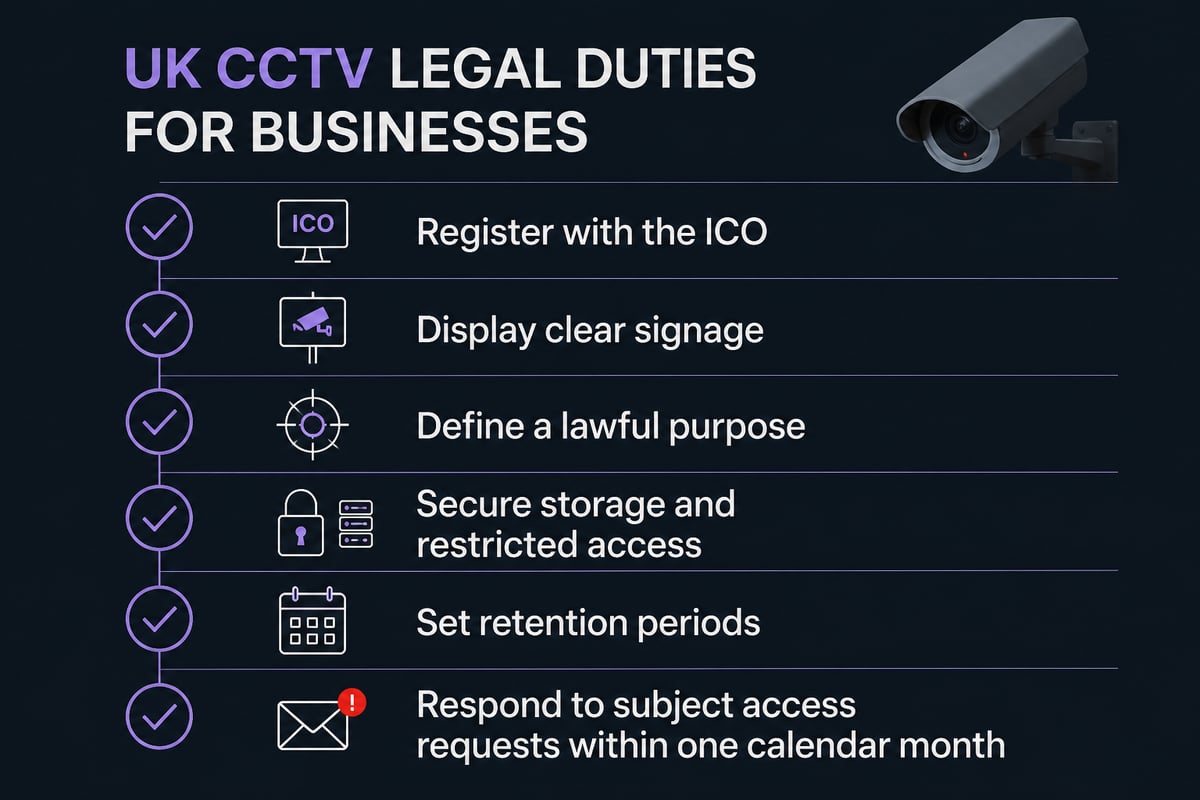
UK CCTV compliance checklist for businesses

What is the Surveillance Camera Code of Practice?

The Surveillance Camera Code of Practice is government guidance setting out 12 guiding principles for responsible use of surveillance cameras, and it is the benchmark many public bodies and larger organisations work to.

According to the amended code on GOV.UK, the principles include a specified legitimate purpose, privacy safeguards, restricted access, secure storage and regular review. Although the code carries statutory weight for certain public authorities, private-sector facilities managers often adopt it voluntarily because it provides a defensible framework.

The government also offers a self-assessment tool that lets you test your practices against the 12 principles. Running through it before installation, and again at each annual review, produces a record of good governance that can be valuable if your system is ever challenged.

Where should cameras be placed?

Camera position matters as much as camera specification: the best placements cover entry and exit points, vulnerable assets and high-risk areas, while avoiding unnecessary views of private spaces.

Start with a risk assessment, then work outward from what you are protecting.

Entrances, receptions and exits

Capture a clear, face-height image of everyone who enters. Avoid mounting cameras so high that they only record the tops of heads, and avoid pointing them into bright glass or direct sunlight, which silhouettes subjects.

Stock, storage and operational areas

Cover loading bays, cash handling points, server rooms and high-value stock. Here the aim is evidential: who accessed what, and when.

Perimeters and car parks

External cameras need weatherproofing, infrared or low-light capability and sensible lighting. Add analytics such as virtual tripwires to alert staff to activity out of hours. ANPR cameras suit sites where vehicle access control is a priority.

Areas to avoid or treat with care

Washrooms, changing areas and staff rest rooms are inappropriate locations. Cameras that capture neighbouring properties or public space beyond what is necessary can create compliance risk, so use privacy masking where a view cannot be avoided.

Can CCTV footage have audio?

Technically yes, but recording audio is far more intrusive than recording video, and in most business settings it is hard to justify under UK data protection law.

Many cameras include microphones, so the capability is common. The legal test is necessity and proportionality: continuous sound recording of conversations is generally considered disproportionate for routine security. Where audio is used at all, such as at an intercom or a point-of-sale dispute location, it should be clearly signposted, limited to a specific purpose and documented in your impact assessment. In most cases, the sensible default is to disable microphones on cameras that do not need them.

Microphones are common on cameras, but continuous audio recording is rarely justified for routine business security.

Are wireless cameras suitable for business use?

Wireless cameras can suit small, temporary or hard-to-cable locations, but for permanent business security a wired or PoE-based system is usually more dependable.

Wireless units depend on a strong, stable signal and, if battery-powered, regular maintenance. Interference, congested networks and flat batteries can all create blind spots. A wired IP system is typically more reliable for continuous recording and is easier to secure against tampering.

If you do consider wireless, weigh these points:

  • Signal strength and range at each camera position
  • Power source and battery replacement routine
  • Encryption and network segregation to prevent unauthorised access
  • Local recording as a fallback if the connection drops

Rather than choosing the "best" wireless system in the abstract, define the site conditions first and have a qualified installer confirm what will perform reliably. A specialist can advise through our commercial CCTV installation service pages.

How do monitoring and remote access improve security?

Monitoring turns CCTV from a passive record into an active security measure by allowing trained operators to see and respond to events as they happen.

Recorded footage helps after an incident. Monitored footage can help prevent one. Remote monitoring links your cameras to an operations centre, where alarms triggered by motion or analytics are verified by an operator who can escalate to keepholders or the emergency services. For unattended premises, such as warehouses overnight or vacant units, this verified response is often what separates a prompt intervention from a discovery the next morning.

Remote access also allows authorised managers to check live views from a secure app or browser. Protect it with unique credentials, multi-factor authentication and up-to-date firmware, since poorly secured cameras are a known entry point for network attacks. Our guide to remote CCTV monitoring outlines how monitored systems work in practice.
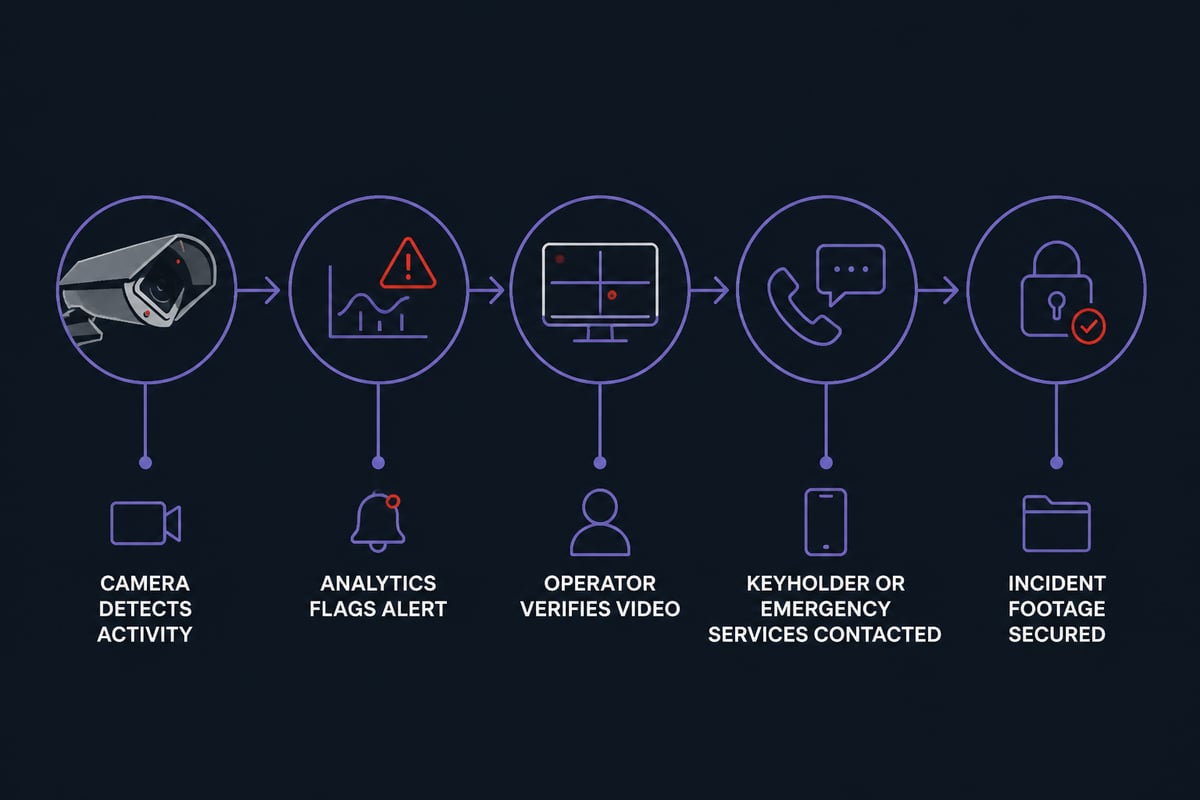
From camera detection to verified response in monitored CCTV

How does CCTV work alongside fire safety?

CCTV and fire safety systems complement each other because video can verify alarms, support evacuation management and help investigators establish what happened, provided the two are designed to work together.

This is a point often missed when security and fire are procured separately. For a Responsible Person managing a commercial or multi-occupied building, integration offers practical benefits:

  • Alarm verification: cameras covering the area of a fire alarm activation help operators distinguish a genuine event from a false alarm before committing resources.
  • Evacuation oversight: live views of stairwells, exits and assembly points help confirm that routes are clear.
  • Access and egress balance: security measures must never obstruct fire escape routes, so camera and access control design should be reviewed alongside your fire risk assessment.
  • Post-incident evidence: footage supports insurance claims and investigations.

Because Logic Fire and Security designs both fire detection and electronic security, the two can be planned as a single, coordinated installation rather than as competing systems. Its commercial CCTV offering provides high-definition surveillance with 24/7 monitoring and evidence for investigations.

How should a CCTV system be maintained?

A CCTV system should be inspected and tested regularly, because an unmaintained system can fail silently and you often discover the fault only when footage is needed.

A sensible maintenance routine includes:

  1. Image checks: confirm each camera is recording a clear, correctly framed image, free of dirt, cobwebs and obstruction.
  2. Recorder and storage health: check drive status and confirm retention periods are being achieved.
  3. Time and date accuracy: inaccurate timestamps weaken the evidential value of footage.
  4. Firmware and cyber security updates: keep devices patched and review user accounts.
  5. Power and backup: test uninterruptible power supplies and network links.
  6. Compliance review: revisit signage, purpose, retention and access logs at least annually.

A planned service agreement with a competent provider is usually more cost-effective than reactive repairs. If you are comparing providers, our note on choosing a CCTV maintenance company sets out what to look for. Accreditation matters too: Logic Fire and Security works with fully trained engineers to design and maintain fire and security systems for businesses across the UK.

How much does commercial CCTV cost?

Commercial CCTV cost depends on the number of cameras, the type of system, cabling complexity, storage, monitoring and ongoing maintenance, so a site survey is the only reliable basis for a quote.

Costs generally divide into three areas: equipment, installation and running costs. Running costs are easy to overlook in a budget and include maintenance, monitoring, storage upgrades and the ICO data protection fee. For a figure tailored to your premises, contact Logic Fire and Security directly rather than relying on generic estimates.

FAQ

Does a CCTV camera work without internet?

Yes. Cameras connected to a local recorder continue to record without an internet connection. You would lose remote viewing and cloud alerts until connectivity returns, so local storage is a sensible safeguard.

Do CCTV cameras record all the time?

It depends on the configuration. Many commercial systems record continuously, while others record only on motion or a schedule to save storage. Continuous recording is usually preferred for high-risk areas where gaps in evidence would be costly.

How long should CCTV footage be kept?

There is no fixed legal period. You should keep footage only as long as needed for your stated purpose, and many organisations settle on around 30 days unless an incident requires longer retention. Document your chosen period and apply it consistently.


Your next step is to walk your premises with your fire risk assessment and current security arrangements in hand, noting entrances, blind spots and any camera that does not produce a usable image. With that list prepared, speak to the team at Logic Fire and Security, who can survey your site and design a coordinated fire and security solution, including commercial CCTV; call 0800 8445 999 or email [email protected] to arrange a conversation about your building.
Fire Extinguisher Guide: Types, Uses and Choosing One

A fire extinguisher is a portable device that discharges an agent to put out or contain a small fire, and the right type depends on what is burning. In UK workplaces, that means matching water, foam, CO2, dry powder or wet chemical units to the fire classes your premises actually present, then keeping them serviced and within reach of an exit.

This guide takes you from the basics to confident use. It covers what each extinguisher is for, how to choose and position them, how to operate one, what servicing involves and how it relates to the rest of your fire strategy.

What is each fire extinguisher for?

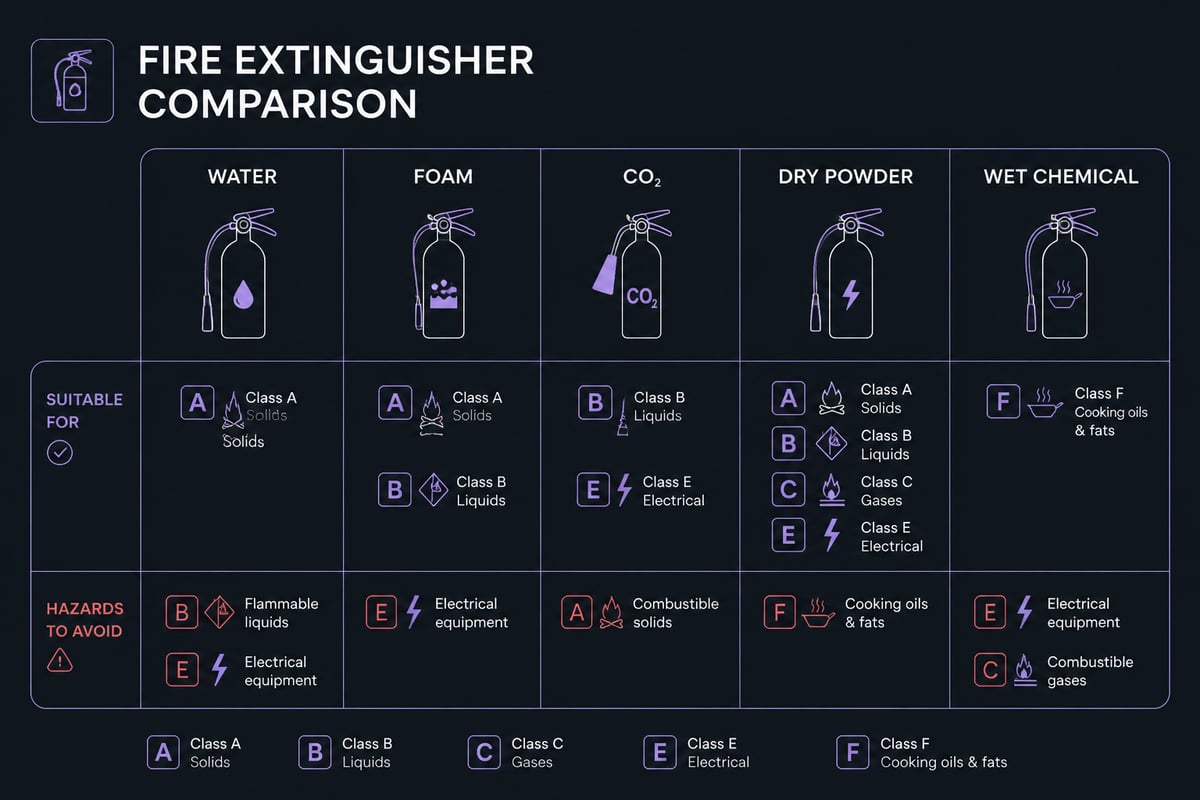
Each type of extinguisher is designed for particular classes of fire, and using the wrong one can spread the fire or create an electrical hazard. Fire is classified by fuel, and the U.S. Fire Administration notes five primary extinguisher types, intended for ordinary combustibles, flammable liquids, energised electrical equipment, flammable metals and cooking oils and fats.

UK and European classifications differ slightly from the American letters, but the principle is the same. The table below summarises the common types found in commercial buildings.

Extinguisher type Typical label colour Suitable for Avoid on
Water Red Paper, wood, textiles, furnishings Flammable liquids, live electrics, cooking oil
Foam Cream Solids and flammable liquids Live electrics, cooking oil
CO2 Black Electrical equipment, flammable liquids Enclosed spaces (risk of asphyxiation)
Dry powder Blue Flammable liquids, gases, live electrics, some metals (specialist powder) Confined spaces, sensitive equipment
Wet chemical Yellow Cooking oils and fats, solids Live electrics, flammable liquids

Water extinguishers are the most common general-purpose option. Foam suits premises where both solids and liquids such as paints or fuels are present. CO2 leaves no residue, which makes it popular in server rooms and offices. Dry powder is versatile but obscures vision and can damage equipment. Wet chemical units are purpose-built for deep fat fryers and commercial kitchens.

Fire extinguisher types matched to fire classes

How do the fire classes work?

Fire classes group fires by the fuel involved, and each extinguisher label states which classes it is approved for. Knowing them lets you read any label in seconds.

  • Class A: ordinary solids such as paper, timber, fabric and plastics.
  • Class B: flammable liquids such as petrol, solvents and paints.
  • Class C: flammable gases.
  • Class D: combustible metals, which need specialist dry powder.
  • Electrical: equipment that is live; once isolated, the fire reverts to the class of the burning material.
  • Class F: cooking oils and fats, covered by wet chemical units.

Ratings also carry numbers. In the U.S. system, a rating such as 1A:10B:C means the 1A is equivalent to 1.25 gallons of water on a Class A fire, while 10B indicates capability on a Class B fire of up to 10 square feet, according to the U.S. Fire Administration. British Standard ratings follow a similar logic, where a higher number reflects a larger fire the unit can handle.

OSHA's guide to portable extinguishers is a useful reference on how classes map to extinguisher types, including its guidance on combustible metals and cooking oils.

What type of fire extinguisher is required for a kitchen?

A commercial kitchen needs a wet chemical extinguisher for cooking oil and fat fires, usually alongside a fire blanket and a suitable unit for electrical equipment. Wet chemical agent cools the oil and forms a soapy layer that helps prevent re-ignition. Water on a fat fire can cause violent flare-ups.

For most kitchens, a sensible combination is:

  1. A wet chemical extinguisher near the fryers and cooking line.
  2. A CO2 extinguisher for appliances and electrical panels.
  3. A fire blanket within easy reach of the hob area.
  4. A water or foam unit for general combustibles such as packaging and furniture.

Larger catering operations often add a fixed fire suppression system over cooking equipment, which discharges automatically to help control a fire at the appliance.

How do you choose the right fire extinguisher for your premises?

Choose extinguishers by starting with your fire risk assessment, which identifies the fuels, ignition sources and people in each area. Selection should follow the hazards found, not a generic checklist.

Work through these questions for each zone:

  • What materials could burn, and which fire classes do they fall into?
  • Is live electrical equipment present?
  • Could a person with no training operate the unit comfortably? The U.S. Fire Administration advises choosing the largest extinguisher the user can safely and comfortably operate, which means weight matters as much as capacity.
  • Does the unit carry a recognised approval mark, such as a UL Listed or ULC Listed label?
  • Will the agent damage stock or equipment if discharged?

Multipurpose units suit mixed-risk areas. The U.S. Fire Administration points out that a multipurpose extinguisher labelled A-B-C can be used on most types of fires. ABC dry powder units can be a poor fit for offices, laboratories and server rooms because of residue and reduced visibility.

A fire risk assessment carried out by a competent person is the legal starting point for this decision, and it should be reviewed whenever the use of a space changes.

Where should a fire extinguisher be placed?

Place extinguishers on escape routes, near exits and close to the specific hazards they serve, mounted so they are visible and easy to lift. Positioning near an exit means the user can fight a small fire with a clear route out behind them.

Good practice for commercial and public buildings includes:

  • Mount units on brackets or stands, with the handle at a height that suits all staff.
  • Group different types together at a "fire point" so the right one is chosen quickly.
  • Place wet chemical units at kitchen exits, not above the fryers, where they would be unreachable in a fire.
  • Keep signage clear, and do not allow storage, pallets or trolleys to obstruct access.
  • Ensure every floor, stairwell landing and plant room has coverage appropriate to its risk.

In multi-occupied and high-rise residential buildings, extinguishers in communal areas should be considered alongside the evacuation strategy. Many such buildings operate a stay-put or phased evacuation policy, so the building manager must decide whether residents or staff are expected to use extinguishers at all, and train accordingly.

How do you use a fire extinguisher safely?

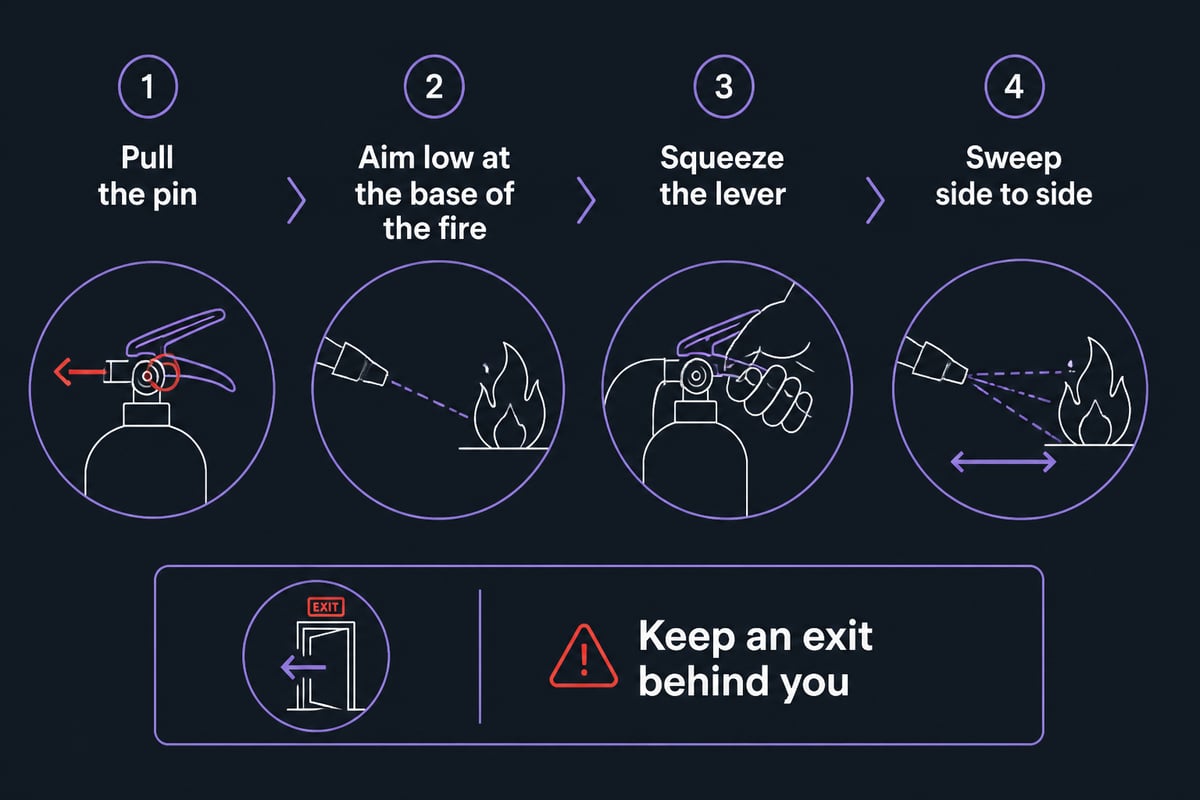
Use the PASS method: pull the pin, aim low at the base of the fire, squeeze the lever and sweep from side to side. OSHA sets out these steps for portable extinguisher operation.

Before attempting any of it, confirm the following:

  1. The fire is small and contained, not spreading beyond the item first alight.
  2. The alarm has been raised and the building is being evacuated.
  3. You have the correct extinguisher for the fuel.
  4. You can stand with an exit behind you.

Leave immediately if the fire grows, smoke fills the room or the extinguisher runs out. After a Class A fire, check for smouldering hot spots. Never tackle a fire to protect property if doing so puts a life at risk.

The PASS method for using an extinguisher

How often must a fire extinguisher be inspected and serviced?

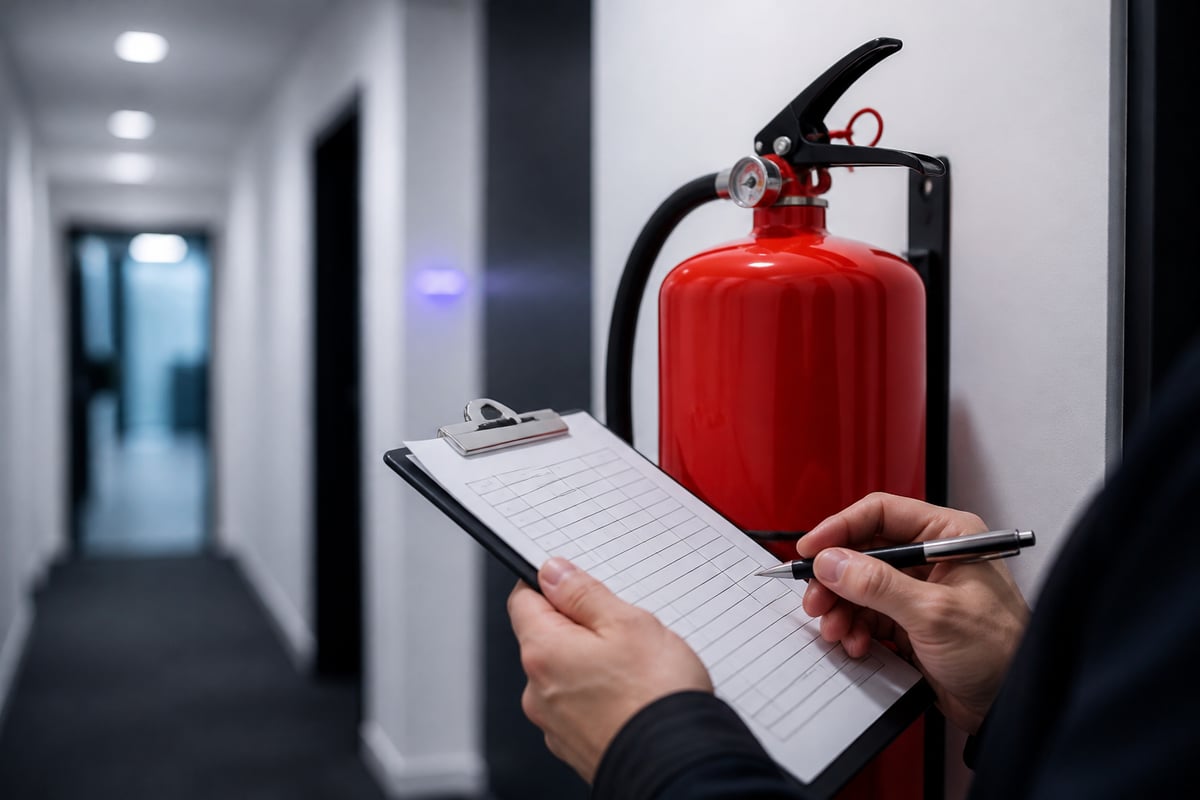
Extinguishers need a quick visual check by a responsible person at regular intervals and a full service by a competent engineer at least once a year. The Regulatory Reform (Fire Safety) Order 2005 requires the Responsible Person to keep firefighting equipment in efficient working order.

A routine visual check, often monthly, should confirm that:

  • The unit is in its designated location and unobstructed.
  • The safety pin and tamper seal are intact.
  • The pressure gauge, where fitted, reads in the operating range.
  • There is no visible damage, corrosion or leakage.

Beyond that, certain units need extended servicing or discharge testing at longer intervals, often five or ten years depending on type. Logic Fire and Security explains the process in its guides to fire extinguisher servicing and fire extinguisher testing.

Keep service records, including dates, engineer details and any units replaced. Auditors, insurers and enforcing authorities may ask to see them.

How often must a fire extinguisher be inspected and serviced?

How much does it cost to have a fire extinguisher serviced in the UK?

Servicing is typically charged per extinguisher, and the price varies with the type, the number of units on site and the contract terms. Larger sites generally secure a lower unit cost, and bundling extinguisher servicing with fire alarm or emergency lighting visits can reduce call-out charges.

Prices differ between providers, so request a written quotation based on a site survey. Compare what is included: labour, replacement tamper seals, new labels, recharges and a certificate of service. Check that the contractor holds recognised accreditation, as an uncertified supplier may not satisfy your insurer.

Replacement and recharging are priced separately. If a unit has been discharged or has failed an inspection, a refilling service or outright replacement may be needed.

Is a fire extinguisher enough on its own?

No. Portable extinguishers are a first-aid measure for small fires, and they work best as one layer in a wider fire strategy. Detection, alarm, emergency lighting, compartmentation and a tested evacuation plan do far more to protect people.

Consider how the layers fit together:

  • Detection and alarm: a well-designed fire alarm system gives the earliest warning, and 24/7 monitoring ensures a signal is acted on even when the building is empty.
  • Emergency lighting: keeps escape routes visible when mains power fails.
  • Fire doors: hold back smoke and flame, and need regular inspection.
  • Suppression: gas or water-based systems protect server rooms, archives and plant areas where manual firefighting is impractical.
  • Training: staff designated as fire wardens should know the extinguisher types on site and when not to use them.

Whatever the mix, each element should appear in your fire risk assessment and be maintained on a schedule.

What are the common mistakes with workplace extinguishers?

The most frequent faults are avoidable and usually found at inspection rather than in an emergency. Recognising them lets you correct them before a fire does.

  • Wrong type for the hazard: a water unit beside a fryer, or powder in a clean room.
  • Blocked or hidden units: extinguishers behind stock, doors or coat racks.
  • Missed servicing: expired certificates and absent tamper seals.
  • Untrained staff: units provided but nobody confident enough to use them.
  • Unchanged layout: a refit or change of use that left the original extinguisher plan out of date.
  • Misplaced reliance: treating extinguishers as a substitute for evacuation.

A short routine of monthly checks, annual servicing and a review after any layout change prevents most of these.

FAQ

Who is the largest manufacturer of fire extinguishers?

Several multinational safety groups produce extinguishers at scale. For a UK business, the manufacturer matters less than third-party certification and servicing by an accredited contractor who can maintain the models you hold.

Can I use any fire extinguisher on an electrical fire?

No. Water and foam units should never be used on live electrical equipment because of the risk of electric shock. CO2 and dry powder are generally suitable, and if it is safe to do so, isolate the power first so the fire can be treated as the class of whatever is burning.

Do all staff need fire extinguisher training?

Only those expected to use one, usually fire wardens and nominated staff, need hands-on training. All employees should still know where extinguishers are, what the alarm sounds like and when to evacuate instead. Refresh training periodically and whenever the extinguisher plan changes.


Start by walking your premises with your latest fire risk assessment and checking that every extinguisher is the right type, in the right place, in date and clearly visible. If any gaps appear, Logic Fire and Security can help: as NICEIC, BAFE and NSI Gold approved contractors with fully trained engineers, they design, install, monitor and maintain fire safety systems for businesses across the UK, so call 0800 8445 999 or email [email protected] to arrange a conversation about your site.

Access Control Installation Cost: A Realistic Budget Guide

Understanding access control installation cost begins with recognising what you're actually purchasing: not just a lock and keypad, but a networked system comprising readers, controllers, power supplies, management software, credentials, and integration with existing fire and security infrastructure. For commercial buildings in 2026, budgets typically range from £800 to £3,500 per controlled door, with the final figure determined by equipment specification, site complexity, regulatory compliance requirements, and the degree of integration needed with fire alarm systems, intruder detection systems and CCTV networks. This guide provides facility managers and responsible persons with a framework for accurate budgeting and a clear understanding of where your investment is directed.

What You're Actually Buying: The Components of Access Control Installation Cost

The access control installation cost comprises several distinct elements, each with its own price range and specification considerations. Understanding these components helps you challenge vague quotations and ensure you're comparing like with like.

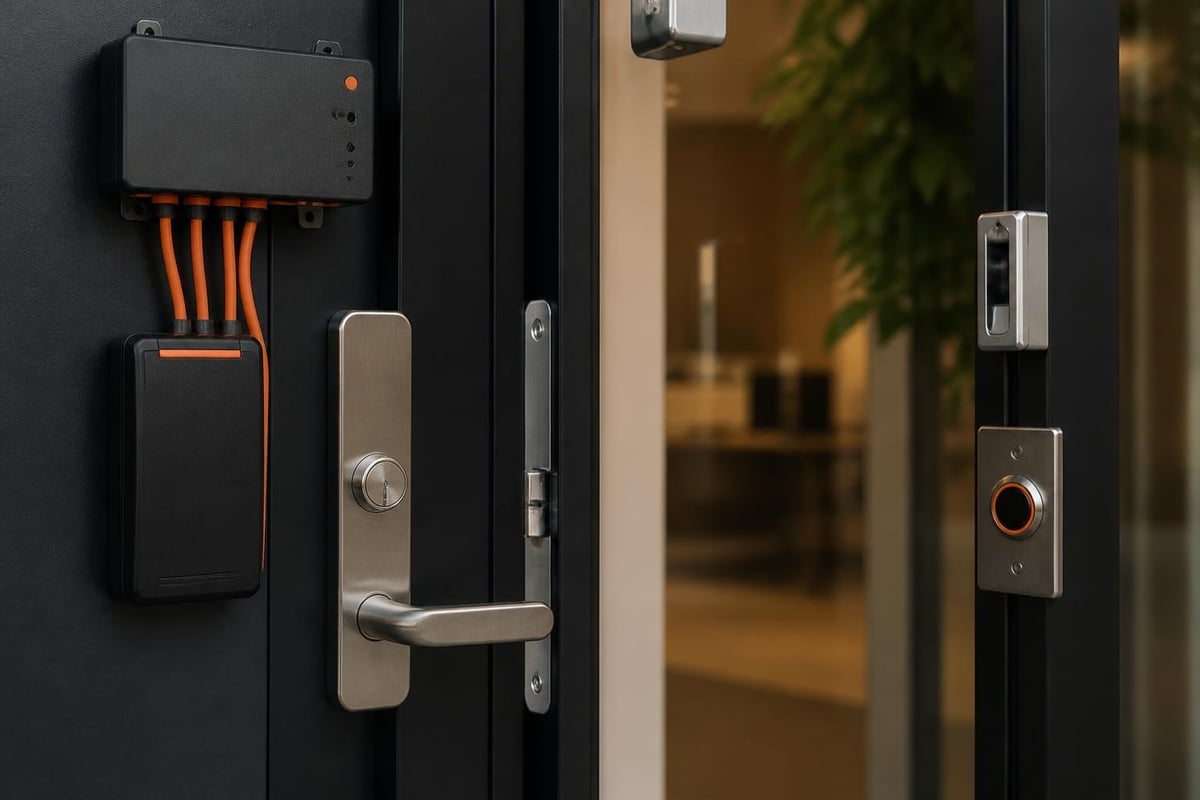
Hardware at the Door

Every controlled entry point requires:

  • Card readers or biometric devices: Proximity readers (MIFARE DESFire, OSDP-compliant) cost £150–£400 each; fingerprint or facial recognition units start at £500
  • Electric locks or magnetic locks: Fail-safe maglocks (releasing on fire alarm activation per BS 7273-4) cost £200–£600; motorised locks range from £300–£900
  • Request-to-exit sensors: Infrared or microwave devices (£80–£200) detect legitimate exit and prevent false alarms
  • Door position switches: Magnetic contacts (£15–£40) monitor door status and trigger alerts for forced or held-open conditions

Access control door components

Controllers and Infrastructure

Door controllers are the intelligence layer that enforces access rules:

  • Single-door controllers: £180–£450 per door, typically PoE-powered for simplified cabling
  • Multi-door controllers: £600–£2,000 units managing 2–8 doors, reducing per-door cost at scale
  • Network switches and cabling: Cat6 structured cabling and PoE switches add £100–£300 per door depending on cable run length
  • Power supplies and backup batteries: Ensuring fail-safe operation during mains failure, £150–£400 per door cluster

The Physical Access Control Systems customer ordering guide published by GSA provides detailed topology descriptions showing how these components interconnect, informing realistic cost planning for multi-door installations.

Management Software and Licences

Central management software is where access control installation cost often includes hidden surprises:

  • Server software licences: £2,000–£15,000 depending on door count and feature set (visitor management, mobile credentials, API integration)
  • Per-door or per-user licences: Annual fees of £40–£150 per door are common with cloud-based platforms
  • Workstation clients: Additional licences for security desks or HR personnel managing credentials (£300–£800 per seat)
  • Integration modules: Connecting to fire, CCTV or building management systems may require add-on licences (£500–£3,000 per integration)

Cost Per Door: Realistic Pricing Bands for 2026

Access control installation cost expressed on a per-door basis provides the clearest benchmark for budgeting, though total project cost depends heavily on door count and system architecture.

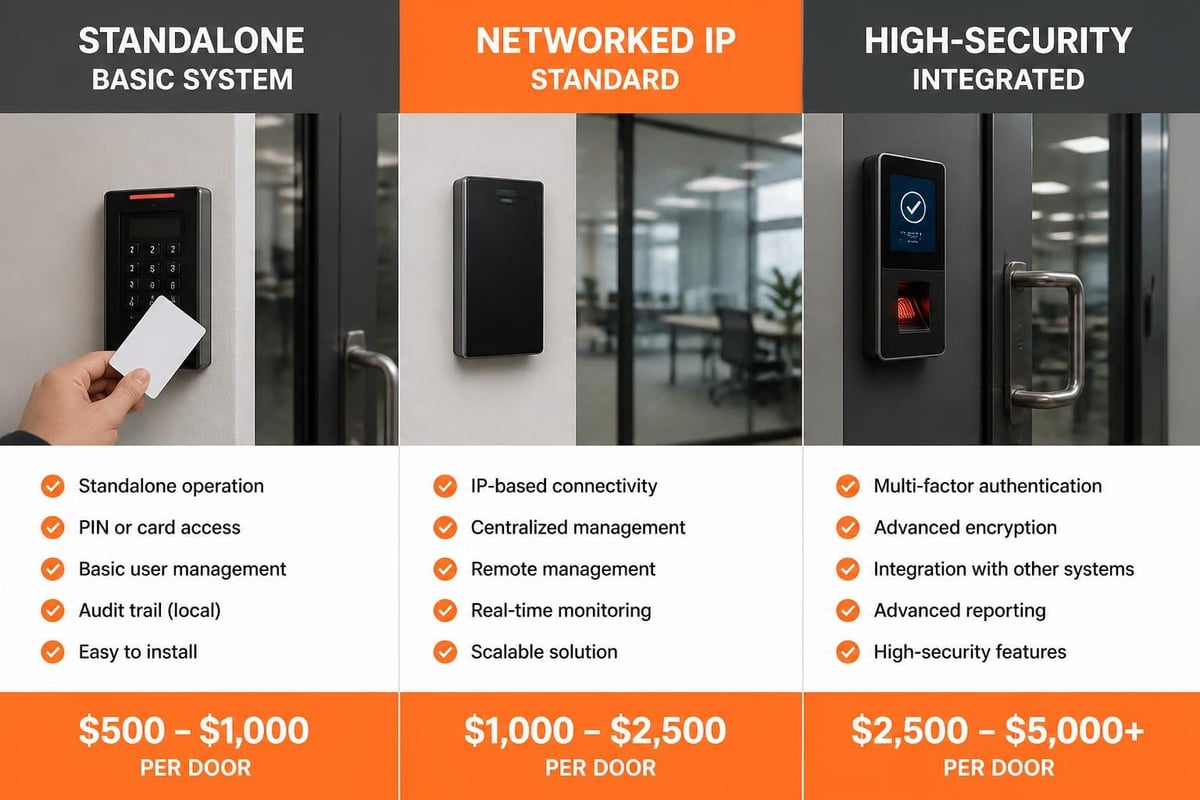
System Tier Per-Door Cost Typical Components Best For
Entry-level standalone £800–£1,200 Proximity reader, electric strike, basic controller, offline operation Low-security internal doors, small sites (under 10 doors)
Networked IP system £1,400–£2,200 OSDP reader, PoE controller, network cabling, central software, credentials Standard commercial installations, most offices and warehouses
High-security integrated £2,400–£3,500 Biometric reader, certified components, fire/intruder integration, redundant servers Data centres, pharmaceutical, critical infrastructure, regulated environments

The access control market analysis published by Grand View Research in 2026 confirms these ranges align with UK commercial installations, with the mid-tier networked IP category representing approximately 65% of new projects.

Economies of Scale

Your per-door access control installation cost decreases significantly with door count:

  • 1–5 doors: £2,200–£3,500 per door (proportionally higher software and server costs)
  • 10–25 doors: £1,400–£2,000 per door (infrastructure costs spread across more endpoints)
  • 50+ doors: £1,000–£1,600 per door (volume discounts, efficient cabling runs, shared controllers)
  • 100+ doors: £850–£1,300 per door (enterprise licensing, dedicated servers justified)

These figures assume standard installation conditions; sites requiring extensive civil works, asbestos surveys, listed building consents or out-of-hours working see costs rise by 20–45%.

Wired Versus Wireless Locks: Installation Cost Trade-offs

The choice between wired and wireless access control dramatically affects installation cost, though total cost of ownership tells a more complex story.

Wired Systems

Traditional hardwired installations dominate commercial projects:

Advantages affecting cost:

  • Lower ongoing maintenance and battery replacement costs
  • Greater reliability in high-traffic applications (no radio interference or battery failures)
  • PoE delivery of power and data via single Cat6 cable reduces cabling complexity
  • Compliance with BS 7273-4 for fail-safe fire door release is straightforward
  • Integration with existing structured cabling and network infrastructure

Cost considerations:

  • Cable installation adds £150–£400 per door depending on run length and building fabric
  • Conduit and trunking for surface-mounted installations in finished buildings
  • Making-good costs for concealed cabling in plasterboard or masonry walls
  • Access equipment (scissor lifts, tower scaffolds) for high-level cable runs

Wireless and Battery-Powered Solutions

Wireless locks reduce installation labour but introduce different cost factors:

Where they reduce access control installation cost:

  • Minimal cabling saves £200–£500 per door in labour and materials
  • Faster installation (typically 2–3 hours per door versus 4–6 for wired)
  • Ideal for listed buildings, glass partitions or locations where cable runs are impractical
  • Retrofit scenarios where existing decorative finishes must be preserved

Hidden cost factors:

  • Hardware costs are 20–40% higher (battery-powered locks cost £450–£1,200 versus £200–£600 for wired)
  • Battery replacement every 2–4 years adds £40–£80 per door in parts and labour
  • Radio frequency surveys may be needed in complex buildings (£800–£2,000)
  • Limited integration options with fire alarm systems increase compliance complexity

The global access controls study by The Freedonia Group identifies wireless growth driven by retrofit demand, though total cost of ownership typically favours wired solutions over 10-year lifecycles.

Wired versus wireless cost comparison

Integrating Fire Door Release, Intruder Detection and CCTV

The access control installation cost increases substantially when systems must integrate with existing commercial security systems, but this integration delivers critical safety and operational benefits.

Fire Alarm Integration and BS 7273-4 Compliance

The Regulatory Reform (Fire Safety) Order 2005 requires that locked final exit doors release automatically upon fire alarm activation. BS 7273-4 specifies the interface arrangements:

  • Fail-safe electromagnetic locks: Release when power is removed by fire alarm system relay outputs
  • Interface modules: Fire panel to access control system signalling (£300–£800 per zone)
  • Emergency break glass units: Manual override points adjacent to final exits (£120–£250 each)
  • Battery backup: Ensures fire alarm can trigger release during mains failure (included in controller costs above)

Integration adds £400–£900 per fire exit door to access control installation cost, but is non-negotiable for regulatory compliance. The NIST guidance on PACS provides technical detail on fail-safe versus fail-secure lock selection that informs specification decisions.

Intruder Alarm System Integration

Connecting access control to intruder detection creates intelligent security zones:

Integration scenarios and costs:

  • Basic door contacts to alarm panel: Existing access control door position switches wired into intruder zones (£150–£300 per door)
  • Two-way communication: Access system arms/disarms alarm panels based on user credentials (£600–£1,500 integration licence plus £200–£400 labour)
  • Alarm-triggered lockdown: Intrusion detection triggers automatic door locking and CCTV recording (£800–£2,000 system integration)

This integration is particularly valuable in warehouse security alarm systems and distribution centres where goods-in/goods-out areas require coordinated security responses.

CCTV and Video Management Integration

Linking access events to video footage provides audit trails and incident investigation capability:

  • Event-triggered recording: Card swipes trigger CCTV bookmarks or recording sequences (£400–£1,200 integration module)
  • Video verification at entry: Security personnel see live video when access is requested (requires additional monitors and interface licensing, £1,500–£3,500)
  • Facial recognition verification: Biometric comparison of card holder to CCTV image (£2,000–£5,000 per door for high-security applications)

The comprehensive approach to security and access control integration ensures that multiple protective layers work cohesively rather than as isolated systems.

Hidden Costs: Licences, Credentials and Maintenance

Quoted access control installation cost often excludes ongoing operational expenses that significantly affect total cost of ownership.

Software Licences and Annual Fees

  • Annual support contracts: 15–22% of software licence value per year (£300–£3,300 annually for typical 20-door systems)
  • Cloud service subscriptions: £8–£25 per door per month for hosted platforms (£96–£300 per door annually)
  • Mobile credential platforms: £3–£8 per user per month for smartphone-based access
  • Software version upgrades: Major releases may require additional licensing (£500–£2,000 every 3–5 years)

Credentials and Consumables

Every authorised person requires a physical or digital credential:

  • Proximity cards: £1.50–£4 each (MIFARE Classic); £3–£8 for secure MIFARE DESFire EV2
  • Key fobs: £2–£6 each for durable ABS enclosures
  • Printed card customisation: Photo ID printing adds £0.80–£2 per card in materials and labour
  • Card printer hardware: £800–£3,500 for direct-to-card or retransfer printers (amortised across credentials)
  • Biometric enrolment: 10–15 minutes per user at typical £45/hour labour rates

A 100-employee site issuing secure photo ID cards incurs £500–£1,200 in initial credential costs, with replacement cards for losses running at approximately 8–12% of headcount annually.

Maintenance and Callout Costs

The PACS selection guide published in peer-reviewed literature emphasises lifecycle planning:

  • Preventive maintenance visits: £180–£350 per visit (recommended quarterly for critical sites)
  • Reactive callout charges: £120–£200 for first hour, then £60–£90 per subsequent hour
  • Parts replacement: Readers, locks and controllers have 7–12 year service lives; budget 5–8% of hardware value annually
  • Database administration: 2–6 hours monthly for user management, audit reviews and credential updates

Budget Bands: What Different Price Points Deliver

Understanding how access control installation cost correlates with capability helps you specify appropriately for your risk profile and operational needs.

£800–£1,200 Per Door: Basic Standalone

What you get:

  • Individual door controllers with offline operation
  • Proximity card readers (125kHz or basic MIFARE)
  • Electric strikes or surface-mounted maglocks
  • Manual programming via controller keypad
  • No central software or reporting
  • Limited user capacity (100–500 credentials per controller)

Appropriate for:

  • Internal office doors with low security requirements
  • Server rooms or storage areas in small businesses
  • Temporary or trial installations
  • Sites with minimal audit or compliance obligations

Red flags: No audit trail, no remote management, difficult to revoke credentials urgently, poor scalability.

£1,400–£2,200 Per Door: Networked IP Standard

What you get:

  • Network-connected controllers with central management software
  • OSDP-compliant readers with secure credential authentication
  • Fail-safe locks with fire alarm integration capability
  • Real-time monitoring and event logging
  • Time-based access rules (access granted only during working hours)
  • Integration with HR systems for automated user provisioning
  • Capacity for 10,000+ users system-wide

Appropriate for:

  • Typical commercial offices, warehouses and retail back-of-house
  • Multi-tenant buildings requiring separated access rights
  • Sites requiring audit trails for insurance or client requirements
  • Businesses with 20+ employees and moderate security risk

This tier represents best value for most commercial installations and aligns with industry standard implementations.

£2,400–£3,500 Per Door: High-Security Integrated

What you get:

  • Biometric verification (fingerprint, facial recognition or iris scanning)
  • FIPS 201-compliant components certified through the FIPS 201 Evaluation Program
  • Redundant servers and failover networking
  • Anti-passback and anti-tailgating enforcement
  • Multi-factor authentication (card plus PIN plus biometric)
  • Full integration with fire, CCTV, building management and alarm monitoring systems
  • Encrypted credential data and secure communications
  • Comprehensive audit logging with tamper-evident storage

Appropriate for:

  • Data centres, research facilities and pharmaceutical manufacturing
  • Sites holding valuable assets or sensitive information
  • Regulated industries (defence, finance, healthcare)
  • Critical national infrastructure

Compliance driver: Many sectors mandate specific security standards that necessitate this investment regardless of door count.

Budget tier comparison

Cheap-Quote Red Flags: When Low Prices Signal Problems

Unusually low access control installation cost quotations often hide deficiencies that compromise security, compliance or total cost of ownership.

Specification Warning Signs

Non-compliant components: Electromagnetic locks that are fail-secure (remaining locked during fire alarm activation) violate BS 7273-4 and the Regulatory Reform (Fire Safety) Order 2005. Ensure specifications explicitly state fail-safe operation for all final exit doors.

Proprietary readers: Systems using manufacturer-specific credential formats lock you into single-source purchasing. Insist on open standards (MIFARE DESFire, OSDP) that allow credential and reader portability.

Inadequate power backup: Battery backup must maintain fail-safe operation for minimum four hours. Cheap installations omit batteries or use undersized units that fail during extended power cuts.

Missing documentation: Professional installations include as-built drawings, programming documentation, and operation manuals. Absence of these documents indicates poor project management and creates long-term support difficulties.

Commercial Practice Concerns

Be cautious of:

  • Verbal-only quotations: Legitimate contractors provide detailed written specifications and breakdowns
  • Pressure to sign quickly: Professional firms allow time for tender comparison and technical review
  • No site survey: Accurate pricing requires physical assessment of cable routes, door types, network infrastructure and power availability
  • Unlicensed software: Pirated management software exposes you to legal liability and lacks vendor support
  • No ongoing support: Installation-only contracts with no maintenance provision leave you stranded after handover

The Secure Technology Alliance physical access publications provide implementation guidance that helps you evaluate whether contractors understand current standards and best practices.

Labour and Experience Factors

Access control installation requires specific competencies:

  • Network cabling certification: Cat6 data cabling should be installed by certified technicians and tested to TIA-568 standards
  • Fire alarm competence: BS 7273-4 integration must be designed and commissioned by engineers with fire alarm qualifications
  • Software configuration expertise: Complex access rules, integration logic and database management require trained specialists

Quotations significantly below market rates often reflect use of unskilled labour, leading to commissioning delays, poor reliability and safety non-compliance. The investment in experienced contractors typically repays itself within months through reduced fault callouts and faster system optimisation.

Long-term Cost Implications

The cheapest access control installation cost often becomes the most expensive over time:

Comparison over 10 years:

Factor Budget Installation Professional Installation
Initial cost (20 doors) £16,000 £28,000
Callout costs (10 years) £8,000–£15,000 £2,000–£4,000
Parts replacement £6,000–£9,000 £3,000–£5,000
System replacement (year 5–7) £18,000–£22,000 Not required
Total 10-year cost £48,000–£62,000 £33,000–£37,000

Quality installations from experienced contractors deliver lower total cost of ownership, better uptime, and simpler compliance demonstration during audits or insurance renewals.


Access control installation cost varies widely based on specification, integration requirements and site complexity, but understanding the components, budget tiers and hidden costs enables informed decision-making that balances initial expenditure against long-term value and compliance obligations. Whether you need basic door control or fully integrated security solutions, Logic Fire and Security brings decades of experience designing and installing access control systems for Blue Chip companies and public agencies across the UK, ensuring your investment delivers robust security, regulatory compliance and operational efficiency tailored to your specific requirements.

Our Accreditations

Work
For Us