

Access controls are the policies, technologies and procedures that decide who or what may enter a space or use a resource, and under what conditions. In a security system, they combine verification of identity with rules about permission, so that only approved people reach doors, gates, barriers, networks and data, and every attempt is recorded.
For anyone responsible for a commercial or public building in the UK, access controls sit alongside fire safety as a core duty of care. They protect people, assets and information, and they support the wider obligations placed on the Responsible Person. This article explains how access controls work, the main models, the four types of security controls, and what to consider when applying them to a building.
How Do Access Controls Work?
Access controls work by checking a request for entry against a set of rules before granting or refusing it. Every request passes through the same logical sequence, whether it is a visitor presenting a card at a door or an employee signing in to a database.
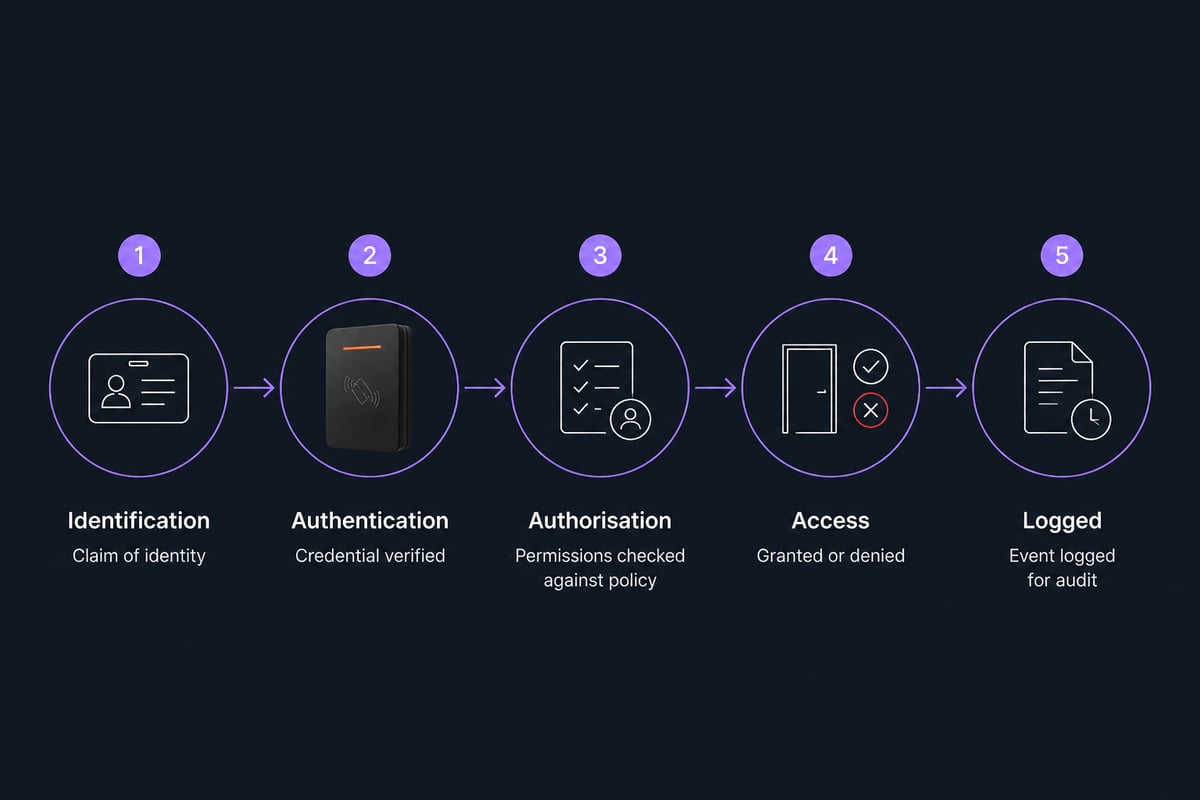
The process has three distinct stages:
- Identification. The person or device states who it is, for example by presenting a proximity card or typing a username.
- Authentication. The system verifies that claim using something the person has (a card or fob), knows (a PIN or password) or is (a fingerprint or face). Combining two or more of these is known as multi-factor authentication.
- Authorisation. The system checks what that verified identity is permitted to do, such as which doors it may open, at what times and on which days.
Every decision is then written to an audit log. That record is what allows a facilities manager to show who entered a plant room last Tuesday, or to investigate an incident after the event.
What Are the Main Components of an Access Control System?
A physical access control system is made up of readers, credentials, controllers, locking hardware and management software, all working together. Each element has a distinct job.
- Credentials: cards, fobs, mobile credentials, PIN codes or biometric templates that represent the user.
- Readers: devices at the point of entry that capture the credential.
- Controllers: the decision-making units that compare the credential against stored permissions.
- Electric locks and barriers: magnetic locks, electric strikes, turnstiles, gates and barriers that physically restrain or release.
- Management software: the platform where administrators add users, set schedules, change permissions and run reports.
- Door monitoring and alarms: sensors that detect doors held open or forced, feeding into the wider security system.
Systems range from stand-alone units controlling a single door to PC-networked installations managing hundreds of doors across several sites. Logic Fire and Security’s access control and door entry service covers stand-alone, PC-networked and door entry systems for gates, doors and barriers, installed as a registered Paxton installer.
What Are the Four Main Access Control Models?
The four main access control models are discretionary (DAC), mandatory (MAC), role-based (RBAC) and attribute-based (ABAC). Each answers the same question, who decides who gets in, in a different way.
| Model | Who sets permissions | Typical setting |
|---|---|---|
| Discretionary (DAC) | The owner of the resource | Small teams, shared folders |
| Mandatory (MAC) | A central authority, using fixed classifications | Government, defence, highly regulated environments |
| Role-based (RBAC) | Administrators, by job role | Offices, hospitals, multi-tenant buildings |
| Attribute-based (ABAC) | Policy rules using user, resource and context attributes | Large or complex organisations with dynamic needs |
Role-based access control is the most common model in commercial buildings. A "cleaner" role might open service corridors between 18:00 and 22:00, while a "finance" role opens the accounts office during working hours. CISA recommends role-based access control that assigns users roles with defined and inherited permissions.
Attribute-based access control goes further by evaluating conditions at the moment of the request. A policy might allow a contractor to enter a plant room only if they hold a current induction, the request falls within the permit window and the door is not under lockdown.
What Is Discretionary Access Control (DAC)?
Discretionary access control is a model in which the owner of a resource decides who else may access it. If an employee creates a shared folder, that employee can grant or withdraw permissions for colleagues without involving a central administrator.
DAC is flexible and quick to set up, which suits small organisations. Its weakness is inconsistency: permissions drift as owners make individual decisions, and a compromised account can pass on access that was never meant to be shared. For buildings with regulated areas, such as server rooms, pharmacies or plant rooms, administrators generally prefer a role-based or policy-driven approach where a central team controls what is granted.
What Is an ACL Access Control?
An ACL, or access control list, is a table attached to a resource that lists which users or groups may perform which actions on it. A file, a network router or a door controller can each hold an ACL.
In a building context, the ACL for a door might read as a simple list: the named users, groups or roles permitted to open it, together with any time restrictions. When someone presents a credential, the controller consults that list and returns an allow or deny decision. ACLs are easy to understand and audit for small numbers of users, but they become unwieldy at scale, which is why larger sites tend to assign permissions to roles and attach those roles to doors rather than listing individuals.
What Are the Four Types of Security Controls?
The four types of security controls are physical, technical, administrative and, in some frameworks, operational or compensating controls. The grouping most often used in security planning separates them by how they work rather than by what they protect.
- Physical controls: barriers, gates, locks, turnstiles, CCTV and security staff that restrict movement in the real world.
- Technical (logical) controls: authentication systems, encryption, firewalls and permission settings that restrict access to digital resources.
- Administrative controls: policies, procedures, staff vetting, training and visitor rules that govern behaviour.
- Compensating controls: alternative measures used where a primary control is not practical, such as a manned reception desk where a door reader cannot be fitted.
Access controls span all of these. A card reader on a door is a physical control backed by a technical one, and the rule about who is issued a card is an administrative one. Effective protection depends on the layers working together rather than on any single device.
What Principles Should Guide Access Controls?
Three principles underpin well-run access controls, and they apply equally to doors and data.
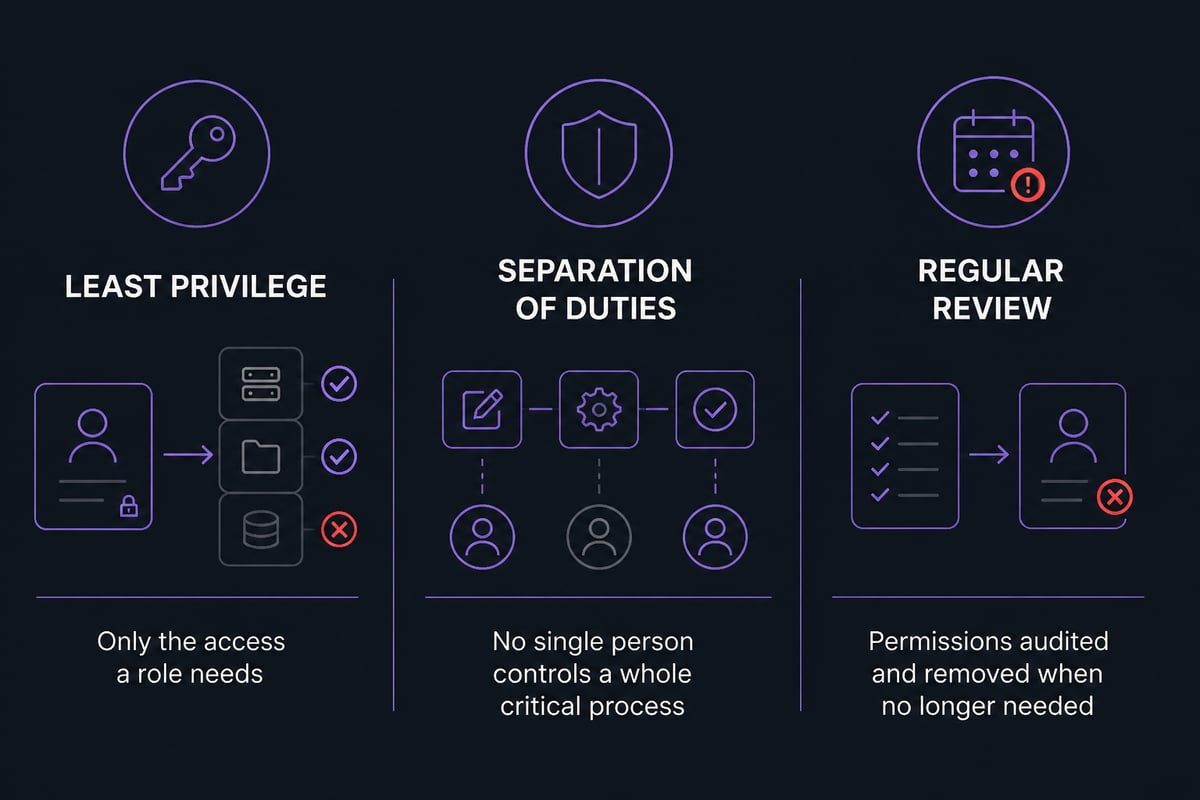
Least privilege. Each person receives only the access their role requires. A receptionist does not need entry to the comms room, and a contractor does not need access to the whole site.
Separation of duties. No single individual should be able to complete a sensitive process alone. The person who issues credentials, for instance, should not be the only one who approves who receives them.
Regular review. Permissions accumulate over time as staff change roles, contractors come and go and temporary access is never withdrawn. A scheduled review, quarterly for high-risk areas, removes what is no longer justified.
These principles also reduce exposure to a well-documented threat. Verizon’s 2025 Data Breach Investigations Report analysed more than 22,000 security incidents, including 12,195 confirmed breaches, and found credential abuse was a leading initial attack vector, ahead of vulnerability exploitation. Tight, reviewed permissions limit what a stolen credential can reach.
Why Do Access Controls Matter for UK Commercial and Public Buildings?
Access controls matter because they reduce the likelihood of theft, unauthorised entry and data exposure, while giving the Responsible Person evidence that the premises are managed deliberately. Their value shows up in several practical ways:
- Protection of people and assets. Controlled entry points limit who can reach staff areas, stock, plant and sensitive records.
- Accountability. Audit trails show who entered which area and when, which supports investigations and insurance claims.
- Compliance support. Restricting and logging access to personal data, cash handling areas or regulated spaces helps demonstrate sound practice under data protection and sector rules.
- Operational efficiency. Lost keys no longer require lock changes, and a lost card can be cancelled in seconds.
Access control also interacts with fire safety. Locked doors must still release for escape, so a system on an escape route needs to fail safe and integrate correctly with the fire alarm. Planning both together avoids conflicts between security and life safety. For more on how door entry and fire systems relate, see Logic Fire and Security's overview of door entry arrangements and its guidance on business access control systems.
What Should You Consider When Choosing an Access Control System?
Choosing a system starts with a clear picture of what you need to protect and who needs to move around the building. A short checklist helps frame the decision:
- Map your zones. Identify public, staff-only, restricted and high-risk areas, and decide the level of control each needs.
- Define your user groups. List employees, contractors, visitors and out-of-hours users, and the access each should have.
- Choose credentials to suit the risk. Cards and fobs suit most doors, while PINs combined with a card or biometrics suit sensitive rooms.
- Plan for fire safety. Confirm that every controlled door on an escape route releases correctly on alarm.
- Think about growth. Select a platform that can add doors, sites and users without replacing the core system.
- Budget for the full life of the system. Include maintenance and servicing, not only the installation. Logic Fire and Security publishes guidance on access control installation cost and on access control maintenance to help with planning.
Regular servicing matters because readers wear, locks drift out of adjustment and software needs updating. A system that was sound at handover can develop weaknesses unnoticed if it is never checked.
What Challenges Come With Managing Access Controls?
The main challenges are permission creep, joiner and leaver processes, integration with existing systems and balancing security with convenience.
- Permission creep. Staff who change roles keep old access unless someone removes it. A review schedule and a clear owner for permissions prevents this.
- Leavers and contractors. Credentials for departed staff or finished contractors must be cancelled promptly. Time-limited credentials help for short-term visitors.
- Legacy equipment. Older doors, wiring and software may not connect to modern platforms, which can require phased upgrades.
- Usability. Controls that slow people down invite workarounds such as propped doors and shared cards. Positioning readers sensibly and keeping routines simple supports compliance.
- Evolving threats. Credentials can be cloned, shared or stolen, so higher-risk areas benefit from two-factor verification.
What Are the Related Terms to Know?
Several terms appear alongside access controls and are often used interchangeably, though they differ in meaning.
- Authentication: confirming that a person or device is who it claims to be.
- Authorisation: deciding what an authenticated identity may do.
- Identity and access management (IAM): the discipline and tooling for managing digital identities and their permissions across systems.
- Multi-factor authentication (MFA): requiring two or more independent proofs of identity.
- Zero trust: a security approach that verifies every request rather than trusting anything by default because of its location.
- Tailgating: an unauthorised person following an authorised one through a door, which physical measures such as turnstiles or door-held-open alarms help to prevent.
- Audit trail: the recorded history of access events used for review and investigation.
FAQ
Is access control the same as authentication?
No. Authentication confirms who someone is, while access control covers the whole process, including authorisation, the rules about what that person may do, and the logging of each event. Authentication is one stage within it.
Can access controls be used on fire exit routes?
Yes, provided they fail safe. Doors on escape routes must release when the fire alarm activates or power is lost, so the access control and fire detection systems should be designed and commissioned together.
How often should access permissions be reviewed?
High-risk areas are commonly reviewed quarterly, with a full audit at least annually. Reviews should also follow any change in staffing, contractors or building layout.
Start by walking your premises and listing every door, gate and barrier alongside who currently has access to it, as that audit shows where permissions have drifted. If you would like specialist support designing, installing or maintaining a system, Logic Fire and Security provides NICEIC, BAFE and NSI Gold approved fire and electronic security solutions across the UK, including its Access Control Entry System service, so call 0800 8445 999 or email [email protected] to discuss your building with its engineers.