

CCTV and surveillance are closely related but not identical: CCTV is a closed network of cameras and recording equipment, while surveillance is the wider practice of observing people, places or activity, using video, access data, alarms and other tools. For a UK business, the practical question is how to use cameras lawfully and effectively to protect people, premises and assets, and this guide takes you from the basics to confident decisions.
Are CCTV and surveillance the same?
No. CCTV is one tool within surveillance, and the two terms describe different things.
CCTV (closed-circuit television) refers to a defined system: cameras, cabling or network links, a recorder and a means of viewing footage. Surveillance is the broader activity of monitoring, which can include automatic number plate recognition (ANPR), body-worn cameras, access control logs, intruder alarms and even analytics software that interprets video.
The distinction matters for compliance. The legal duties attached to recording identifiable people apply to the data you collect, regardless of whether it comes from a simple camera or an advanced analytics platform. A business that adds facial recognition to existing cameras, for example, moves into a more heavily regulated area. The ICO publishes guidance on facial recognition technology and surveillance that is worth reading before any such step.
What does a commercial CCTV system consist of?
A commercial CCTV system consists of cameras, a recorder, storage, power and network infrastructure, and a way of viewing live and recorded images.
The main components are:
- Cameras: fixed, dome, bullet, pan-tilt-zoom (PTZ) or thermal units, chosen for the location and the task.
- Recorder: a digital video recorder (DVR) for analogue systems or a network video recorder (NVR) for IP systems.
- Storage: hard drives sized to the number of cameras, resolution and retention period.
- Cabling and power: coaxial or Ethernet cabling, often with Power over Ethernet (PoE) so one cable carries both data and power.
- Viewing and access: monitors on site, plus secure remote access for authorised staff.
- Supporting equipment: lighting, infrared illuminators, uninterruptible power supplies and network switches.
A well-specified system treats these as a single design, not a list of purchases. Poor storage sizing or an unreliable power supply can leave you with gaps in footage precisely when you need it. Our overview of commercial CCTV systems covers how the parts fit together in more detail.
Analogue or IP: which type of CCTV suits a business?
For most new commercial installations, IP (network) CCTV is the better choice, while analogue remains viable where existing coaxial cabling can be reused.
Analogue systems send video over coaxial cable to a DVR. They are simple and can be cost-effective when upgrading an existing site, particularly with modern high-definition analogue formats. Resolution and flexibility are more limited.
IP systems send digital video over a network to an NVR or cloud platform. They offer higher resolution, easier scaling, remote access, PoE and built-in analytics such as motion zones and line-crossing alerts. The trade-off is that they depend on a well-designed, secure network.
| Factor | Analogue (HD) | IP (network) |
|---|---|---|
| Image quality | Good | Typically higher |
| Cabling | Coaxial plus power | Ethernet, often PoE |
| Remote access | Via recorder | Native |
| Analytics | Limited | Extensive |
| Scalability | Limited by recorder inputs | Flexible |
| Best suited to | Upgrading existing sites | New builds and larger sites |
Hybrid recorders let you run both during a phased upgrade, which suits multi-site estates that cannot replace everything at once.
What are the legal requirements for using CCTV in the UK?
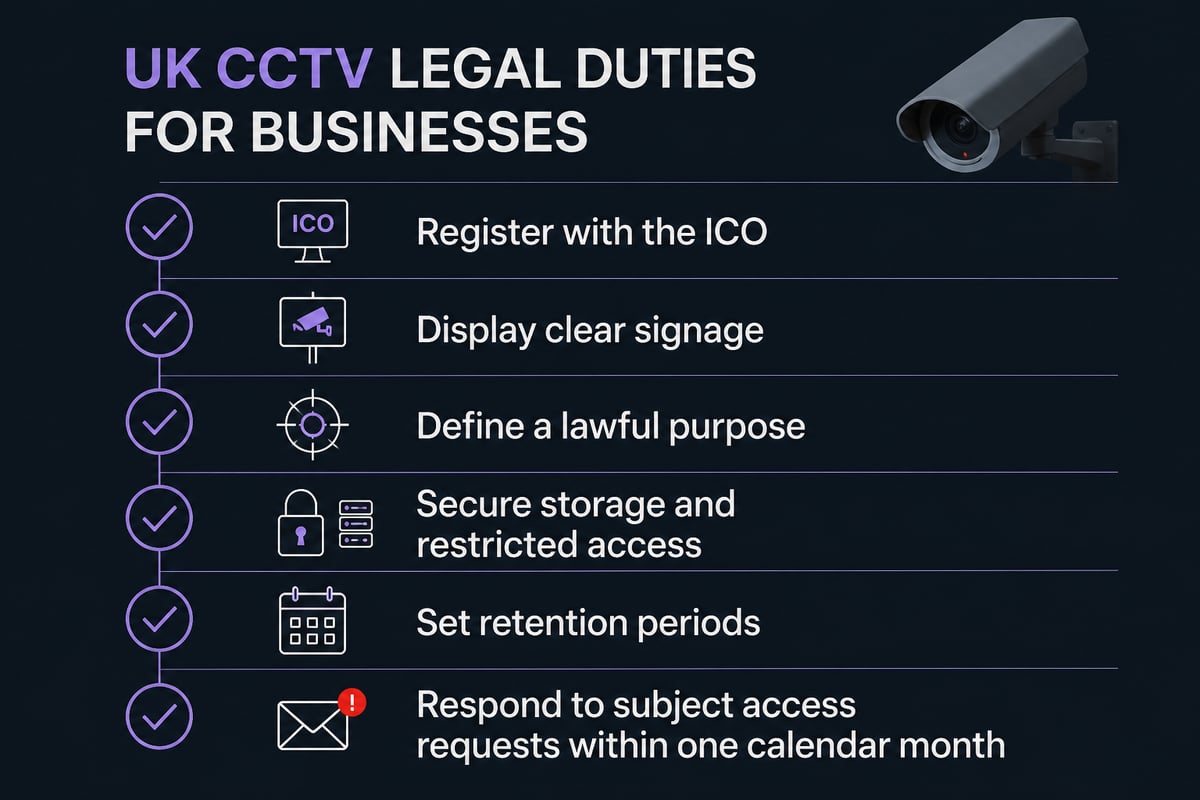
UK businesses using CCTV that captures identifiable people must comply with UK GDPR and the Data Protection Act 2018, which means having a lawful purpose, being transparent and keeping footage secure.
The key obligations are as follows:
- Register with the ICO. Organisations using CCTV that captures identifiable individuals generally need to pay the data protection fee. The ICO states that small and medium-sized organisations pay £52 or £78 annually, reduced to £47 or £73 by direct debit.
- Tell people they are being recorded. GOV.UK explains that people must be told they may be recorded, usually with signs that are clearly visible and readable.
- Respond to access requests. Individuals can ask for CCTV images of themselves, and businesses usually must provide the footage free of charge within one calendar month, per the same GOV.UK guidance.
- Define your purpose. Record why you are using cameras, such as crime prevention or health and safety, and do not use footage for unrelated aims.
- Limit retention and access. Keep footage only as long as needed and restrict who can view it.
- Carry out a data protection impact assessment where monitoring is extensive or uses more intrusive technology.
The ICO's video surveillance guidance explains its focus on transparency, accountability and data protection by design. Note that the ICO has indicated this guidance is under review following the Data (Use and Access) Act, so check for updates periodically. For a plain-language summary, see our article on CCTV laws in the UK.
What is the Surveillance Camera Code of Practice?
The Surveillance Camera Code of Practice is government guidance setting out 12 guiding principles for responsible use of surveillance cameras, and it is the benchmark many public bodies and larger organisations work to.
According to the amended code on GOV.UK, the principles include a specified legitimate purpose, privacy safeguards, restricted access, secure storage and regular review. Although the code carries statutory weight for certain public authorities, private-sector facilities managers often adopt it voluntarily because it provides a defensible framework.
The government also offers a self-assessment tool that lets you test your practices against the 12 principles. Running through it before installation, and again at each annual review, produces a record of good governance that can be valuable if your system is ever challenged.
Where should cameras be placed?
Camera position matters as much as camera specification: the best placements cover entry and exit points, vulnerable assets and high-risk areas, while avoiding unnecessary views of private spaces.
Start with a risk assessment, then work outward from what you are protecting.
Entrances, receptions and exits
Capture a clear, face-height image of everyone who enters. Avoid mounting cameras so high that they only record the tops of heads, and avoid pointing them into bright glass or direct sunlight, which silhouettes subjects.
Stock, storage and operational areas
Cover loading bays, cash handling points, server rooms and high-value stock. Here the aim is evidential: who accessed what, and when.
Perimeters and car parks
External cameras need weatherproofing, infrared or low-light capability and sensible lighting. Add analytics such as virtual tripwires to alert staff to activity out of hours. ANPR cameras suit sites where vehicle access control is a priority.
Areas to avoid or treat with care
Washrooms, changing areas and staff rest rooms are inappropriate locations. Cameras that capture neighbouring properties or public space beyond what is necessary can create compliance risk, so use privacy masking where a view cannot be avoided.
Can CCTV footage have audio?
Technically yes, but recording audio is far more intrusive than recording video, and in most business settings it is hard to justify under UK data protection law.
Many cameras include microphones, so the capability is common. The legal test is necessity and proportionality: continuous sound recording of conversations is generally considered disproportionate for routine security. Where audio is used at all, such as at an intercom or a point-of-sale dispute location, it should be clearly signposted, limited to a specific purpose and documented in your impact assessment. In most cases, the sensible default is to disable microphones on cameras that do not need them.
Microphones are common on cameras, but continuous audio recording is rarely justified for routine business security.
Are wireless cameras suitable for business use?
Wireless cameras can suit small, temporary or hard-to-cable locations, but for permanent business security a wired or PoE-based system is usually more dependable.
Wireless units depend on a strong, stable signal and, if battery-powered, regular maintenance. Interference, congested networks and flat batteries can all create blind spots. A wired IP system is typically more reliable for continuous recording and is easier to secure against tampering.
If you do consider wireless, weigh these points:
- Signal strength and range at each camera position
- Power source and battery replacement routine
- Encryption and network segregation to prevent unauthorised access
- Local recording as a fallback if the connection drops
Rather than choosing the "best" wireless system in the abstract, define the site conditions first and have a qualified installer confirm what will perform reliably. A specialist can advise through our commercial CCTV installation service pages.
How do monitoring and remote access improve security?
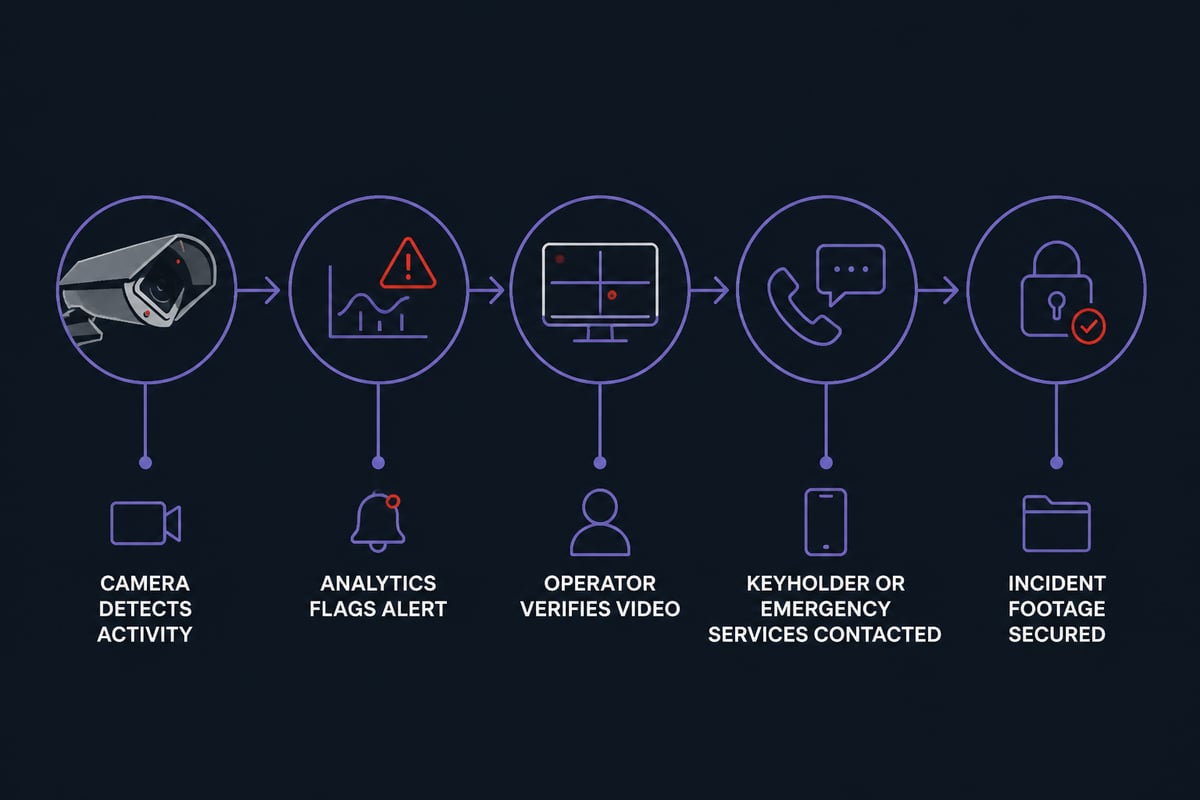
Monitoring turns CCTV from a passive record into an active security measure by allowing trained operators to see and respond to events as they happen.
Recorded footage helps after an incident. Monitored footage can help prevent one. Remote monitoring links your cameras to an operations centre, where alarms triggered by motion or analytics are verified by an operator who can escalate to keepholders or the emergency services. For unattended premises, such as warehouses overnight or vacant units, this verified response is often what separates a prompt intervention from a discovery the next morning.
Remote access also allows authorised managers to check live views from a secure app or browser. Protect it with unique credentials, multi-factor authentication and up-to-date firmware, since poorly secured cameras are a known entry point for network attacks. Our guide to remote CCTV monitoring outlines how monitored systems work in practice.
How does CCTV work alongside fire safety?
CCTV and fire safety systems complement each other because video can verify alarms, support evacuation management and help investigators establish what happened, provided the two are designed to work together.
This is a point often missed when security and fire are procured separately. For a Responsible Person managing a commercial or multi-occupied building, integration offers practical benefits:
- Alarm verification: cameras covering the area of a fire alarm activation help operators distinguish a genuine event from a false alarm before committing resources.
- Evacuation oversight: live views of stairwells, exits and assembly points help confirm that routes are clear.
- Access and egress balance: security measures must never obstruct fire escape routes, so camera and access control design should be reviewed alongside your fire risk assessment.
- Post-incident evidence: footage supports insurance claims and investigations.
Because Logic Fire and Security designs both fire detection and electronic security, the two can be planned as a single, coordinated installation rather than as competing systems. Its commercial CCTV offering provides high-definition surveillance with 24/7 monitoring and evidence for investigations.
How should a CCTV system be maintained?
A CCTV system should be inspected and tested regularly, because an unmaintained system can fail silently and you often discover the fault only when footage is needed.
A sensible maintenance routine includes:
- Image checks: confirm each camera is recording a clear, correctly framed image, free of dirt, cobwebs and obstruction.
- Recorder and storage health: check drive status and confirm retention periods are being achieved.
- Time and date accuracy: inaccurate timestamps weaken the evidential value of footage.
- Firmware and cyber security updates: keep devices patched and review user accounts.
- Power and backup: test uninterruptible power supplies and network links.
- Compliance review: revisit signage, purpose, retention and access logs at least annually.
A planned service agreement with a competent provider is usually more cost-effective than reactive repairs. If you are comparing providers, our note on choosing a CCTV maintenance company sets out what to look for. Accreditation matters too: Logic Fire and Security works with fully trained engineers to design and maintain fire and security systems for businesses across the UK.
How much does commercial CCTV cost?
Commercial CCTV cost depends on the number of cameras, the type of system, cabling complexity, storage, monitoring and ongoing maintenance, so a site survey is the only reliable basis for a quote.
Costs generally divide into three areas: equipment, installation and running costs. Running costs are easy to overlook in a budget and include maintenance, monitoring, storage upgrades and the ICO data protection fee. For a figure tailored to your premises, contact Logic Fire and Security directly rather than relying on generic estimates.
FAQ
Does a CCTV camera work without internet?
Yes. Cameras connected to a local recorder continue to record without an internet connection. You would lose remote viewing and cloud alerts until connectivity returns, so local storage is a sensible safeguard.
Do CCTV cameras record all the time?
It depends on the configuration. Many commercial systems record continuously, while others record only on motion or a schedule to save storage. Continuous recording is usually preferred for high-risk areas where gaps in evidence would be costly.
How long should CCTV footage be kept?
There is no fixed legal period. You should keep footage only as long as needed for your stated purpose, and many organisations settle on around 30 days unless an incident requires longer retention. Document your chosen period and apply it consistently.
Your next step is to walk your premises with your fire risk assessment and current security arrangements in hand, noting entrances, blind spots and any camera that does not produce a usable image. With that list prepared, speak to the team at Logic Fire and Security, who can survey your site and design a coordinated fire and security solution, including commercial CCTV; call 0800 8445 999 or email info@logicfireandsecurity.com to arrange a conversation about your building.